
Solar Computation: Size Your Solar Setup From Your Electric Bill
Last checked · JH Solar guide

This solar computation tool turns your electric bill and your appliance list into a system size. Type the kWh from your bill, add your appliances, pick grid-tie, hybrid or off-grid, and choose how long the battery should run after 6 PM. The numbers update as you type: daily use, battery size, highest load at once, inverter size and number of solar panels. Then tap Analyze my setup, and our AI helper suggests several setups with price ranges, a JH Solar option first.
Below the calculator are a setup checker for mixing your own parts and the guide: how to read your bill, how to compute solar setup sizes by hand, worked examples, and what to do next.
Solar Computation Calculator
Fixed assumptions for the Philippines
- 4 hours of full sun a day (a careful Philippine average).
- 75% of the panel power reaches your outlets, after heat, dust and wire losses.
- Batteries: we use 90% of the label size, and 95% of that comes back out.
- Solar makes almost no power from 6 PM until about 6 AM.
- The inverter is 25% bigger than your highest load, for extra room for start-up.
- Off-grid adds 25% more solar panels for cloudy days.
- Panels are 620 W each; a month is 30 days; the rate is ₱13 per kWh when you skip the price per kWh.
Check a Solar Setup: Mix and Match Parts
Pick an inverter and a panel, set how many panels go on each input, and see if the setup works. Runs on your device only.
Loads, weather and temperature assumptions
Lower in highland areas
Typical; use the datasheet
Typical; use the datasheet
This setup checks out· 8 panels · 5 kWp
OKMPPT 1: cold-morning voltage 200 V (limit 500 V)
4 × 48.6 V × 1 (cold factor) stays under the maximum.
OKMPPT 1: hot-afternoon working voltage 139 V (MPPT starts at 120 V)
The string stays inside the tracking range even when the panels are hot.
NoteMPPT 1: input current 16 A
Check this against the inverter datasheet (max PV input or short-circuit current).
OKMPPT 1: 2,480 W of panels (limit 5,500 W)
Within the input power limit.
OKMPPT 2: cold-morning voltage 200 V (limit 500 V)
4 × 48.6 V × 1 (cold factor) stays under the maximum.
OKMPPT 2: hot-afternoon working voltage 139 V (MPPT starts at 120 V)
The string stays inside the tracking range even when the panels are hot.
NoteMPPT 2: input current 16 A
Check this against the inverter datasheet (max PV input or short-circuit current).
OKMPPT 2: 2,480 W of panels (limit 5,500 W)
Within the input power limit.
OKTotal array 5 kWp (8 panels)
Total solar input limit: 11,000 W.
OKCharging: about 3,968 W from the panels vs 8,192 W battery charge limit
The battery can take everything the panels make (after about 20% losses).
NoteDaily solar: about 14.9 kWh (97% of the 15.4 kWh battery)
Enough if you usually use part of the battery each night; not enough to refill it from empty in one day.
OKInverter 11 kW vs peak load 2,500 W (+25% = 3.1 kW)
Enough room for your peak load and start-up surges.
OKBackup: 6.4 kWh needed vs about 13.1 kWh usable
Runs 800 W for about 16.4 h (90% usable, 95% efficiency).
NoteAC side: about 47.8 A at 230 V → 63 A breaker as a starting point
Your licensed electrician confirms the breaker and cable size from the inverter manual and the Philippine Electrical Code.
A planning check, not a design. Exact limits come from each product's datasheet, and the final wiring, breakers and cable sizes are set by a licensed electrician under the Philippine Electrical Code.
How This Solar Computation Works
A solar computation answers three questions. How much energy do you use in a day? How much panel power makes that energy under Philippine sun? And how much battery and inverter does your goal need? People look for a solar panel calculator because quotes are hard to compare when you do not know the size you need, and brownouts make backup urgent.
Five steps, then the analysis
Start with the kWh on your bill; the price per kWh on your bill is optional and gives your rate. List your appliances: common ones fill in instantly from our list, and for anything else the AI helper looks up typical watts, which you can change. Pick a goal, set the battery hours, and check the highest load running at once.
Analyze my setup sends only appliance names and numbers. Back come option cards: a JH Solar package first, then budget-friendly, moderate and premium setups with separate parts, and portable power stations. Each card lists parts, an estimated price range, a short reason, how much of your use it covers, and a detailed wiring diagram with the real breaker and cable sizes. Prices are ranges; JH Solar confirms the setup and price after a site visit.

How to Read Your Meralco or Electric Cooperative Bill
Every solar computation starts with the bill. Meralco and electric cooperative bills look different but carry the same items, and you need only three: kWh used, billing period and total amount. Look near the meter readings: present minus previous reading is the kWh you used (some meters use a multiplier, so take the kWh figure the bill prints). The billing period shows the start and end dates.
The rate is split into many lines, so divide the total amount by the kWh used to get your effective rate. Charges change every month, so last month’s rate is only a guide. For a wider view, see the Department of Energy’s electricity rate data for the Philippines. In the calculator, type the amount from your own latest bill; without it, the tool uses a fixed ₱13 per kWh and says so.
| Bill item | What it means | Used in the calculator? |
|---|---|---|
| kWh used | Present minus previous reading, times any multiplier | Yes: required |
| Billing period | Start and end dates; often not exactly 30 days | The tool uses 30 days |
| Total amount | All charges and taxes | Optional: gives your rate |
| Effective rate | Total ÷ kWh; changes monthly | Worked out for you; values your solar power |
| Name, address and Customer Account Number (CAN) | Your identity with the utility | No: hide them before the photo |
From Bill to kWh: The First Step in Solar Computation
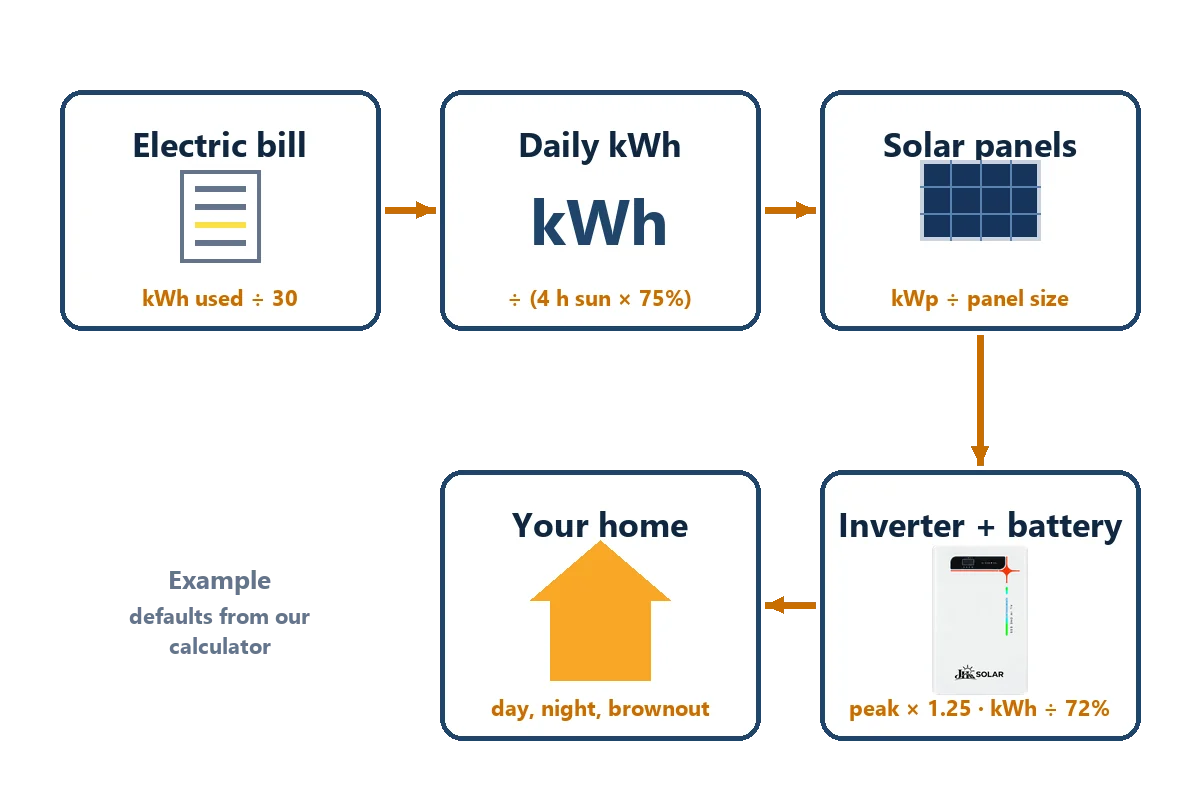
Panels are sized in energy, not pesos, so the first step of any solar computation is to get kWh. If your bill shows kWh, use it. If you only have pesos: monthly kWh = bill ÷ rate per kWh. Divide by 30 for daily kWh, as the calculator does.
Hot months bring more aircon hours, so average two or three bills for the panels, and keep your highest month in mind for the battery and inverter.
Your Appliance List: How to Compute Solar Setup Load by Load
This is how to compute solar setup sizes load by load: daily kWh = watts × hours per day ÷ 1,000, added up for every appliance. Take the watts from each label when you can. Example from our records: an inverter-type aircon averaging 800 W × 8 h ÷ 1,000 = 6.4 kWh a day.
In the calculator, type an appliance and pick it from the list of common Philippine appliances. If yours is not there, the AI helper looks up a typical value. Some appliances run on and off: a refrigerator compressor runs about 40% of the time, so the tool counts only that share. For each one, tick Use at night on battery and type the hours after 6 PM.
| Appliance | Watts × hours × qty | kWh per day |
|---|---|---|
| Aircon 1HP, inverter type (average) | 800 W × 8 h × 1 | 6.40 |
| Refrigerator (average) | 150 W × 8 h × 1 | 1.20 |
| Electric fan | 60 W × 8 h × 2 | 0.96 |
| LED bulbs | 10 W × 6 h × 5 | 0.30 |
| TV | 100 W × 4 h × 1 | 0.40 |
| Total | Sum of the rows | 9.26 |
Example values only. Use the watts on your own labels and your real hours.
The list gives two figures. Daily kWh sizes the panels and battery. The highest load at once sizes the inverter. The tool first shows what happens if everything runs together, here 800 + 150 + 120 + 50 + 100 = 1,220 W. Lower it to what usually runs at the same time. On a JH Solar unit your whole house panel runs through it, so in a brownout this figure must stay within 7 kW (Version 1) or 11 kW (Version 2).
Sun Hours and Losses
Two fixed values turn daily kWh into panel size in a solar computation. Both appear under Fixed assumptions in the calculator.
Peak sun hours count hours of full-strength sunlight. In the Philippines they are typically about 3.5 to 5 a day, depending on place and season; the calculator uses 4, a careful average. Check your city on the Global Solar Atlas map of solar resource.
Panels never deliver their full rating to your sockets. The tool assumes 75% of panel power reaches your loads after heat, dust, cable and inverter losses. A shaded or rarely cleaned roof will do worse, which the site visit checks.
Sizing Panels, Inverter and Battery
With daily kWh, sun hours and losses in hand, the rest of the solar computation is three short formulas. The calculator uses 620 W panels, so the count you see is for that size.
- Panels: panel power in kW = daily kWh ÷ (sun hours × 75%). Divide by one panel’s kW and round up. For hybrid and off-grid, the tool adds the small charging loss for the energy that passes through the battery.
- Inverter (kW, not kWh): the highest load running at once, plus 25% extra room for start-up from aircon compressors, refrigerators and pumps, rounded up to the next half kW. Also check the surge rating in the inverter’s data sheet.
- Battery size: you cannot use a battery’s full label size (you stop before it is empty to protect its life), and some energy is lost on the way to the outlet. Battery size = night kWh ÷ (90% × 95%). Only the night counts: by day the panels run your loads and refill the battery.
| Result | Formula | Example |
|---|---|---|
| Daily use | Σ (watts × hours) ÷ 1,000 | 800 W × 8 h ÷ 1,000 = 6.4 kWh |
| Panel power | Daily kWh ÷ (sun hours × 75%) | 10 kWh ÷ (4 × 0.75) = 3.33 kW |
| Panel count | Panel kW ÷ one panel’s kW, rounded up | 3.33 ÷ 0.62 = 5.4 → 6 × 620 W |
| Battery size | Night kWh ÷ (usable × efficiency) | 6.4 ÷ (0.9 × 0.95) ≈ 7.49 kWh |
| Inverter | Highest load × 1.25, next half kW | 1,220 W × 1.25 = 1.53 → 2 kW |
Examples use the calculator's fixed assumptions. Examples only, not a design.
Three Goals, Three Different Results
Grid-tie needs no battery, but a grid-tied inverter shuts down during a brownout to protect line workers, so it gives no backup. Unused daytime energy earns credit only under net metering: read the Meralco net metering FAQ and check current requirements with your utility.
Hybrid adds a battery for the appliances you mark for the night. Solar output is near zero by 6 PM in the Philippines, so the battery window starts at 6 PM and ends at the hour you pick, up to 6 AM. Off-grid uses the same battery math with no power company at all, so the tool adds 25% more panels for cloudy days.
| Goal | Night use on battery | Battery size (÷ 0.855) | Solar panels (620 W) | Works in a brownout? |
|---|---|---|---|---|
| Grid-tie | None | — | 6 (3.72 kW total) | No, unless a battery is added |
| Hybrid | 500 W × 8 h = 4 kWh | About 4.68 kWh | 6 (3.72 kW total) | Yes, for the night loads |
| Off-grid | 500 W × 8 h = 4 kWh | About 4.68 kWh | 7 (4.34 kW total) | Yes: there is no grid |
Off-grid adds 25% more panels. 0.855 = 90% usable × 95% efficiency. Examples only.
How Net Metering Changes Your Solar Computation
With grid-tie, ask what happens to solar you do not use the moment it is made. Without net metering it is held back by the inverter (zero export) or wasted. With net metering, the surplus goes to Meralco or your cooperative and earns a peso credit, which since the 2025 rule changes can roll over to later bills.
Credits are worth less than the power you buy: the DOE says exports are credited at the utility’s blended generation cost, not the full rate per kWh. So keep your solar computation sized to your own daytime use, and treat exports as a bonus. Systems up to 100 kW qualify, and the account must be in your name. For documents, fees and timelines, see our net metering guide for the Philippines.
Worked Examples
These follow the calculator’s solar computation steps with its fixed assumptions. Examples only, not quotes.
Example 1, a 576 kWh bill, grid-tie. The bill shows 576 kWh and ₱9,500, so the rate is ₱9,500 ÷ 576 ≈ ₱16.49 per kWh (an example, not a current rate). Daily use: 576 ÷ 30 = 19.2 kWh. Panels: 19.2 ÷ (4 × 0.75) = 6.4 kW, or 11 panels of 620 W (6.82 kW total). That is more than Version 1’s 6-panel array and within Version 2’s largest array of 16 panels.
Example 2, the appliance list, hybrid. To run the aircon on battery for 8 hours after 6 PM: 6.4 ÷ (0.9 × 0.95) ≈ 7.49 kWh of battery. The whole list running together is 1,220 W, so the inverter is about 2 kW. Version 1 is rated at 7 kW with a 16.38 kWh battery, so both fit on paper; we confirm the fit after a site visit.
Example 3, Version 2’s battery. The rated 15.36 kWh × 0.9 × 0.95 ≈ 13.13 kWh to your appliances, about 13 hours at a steady 1 kW. Real loads rise and fall, so actual hours will differ.
What a Solar Computation Cannot Tell You
A solar computation has clear benefits: it shows your real usage, lets you compare quotes on the same panel size, and helps you spot a package that is too small. The estimate still cannot check:
- Your actual parts. Each panel string must fit the voltage and current limits of each solar input on the inverter you buy (see how a solar charge tracker works), and the price ranges change with stock and brand.
- Shade from a tree, water tank or neighbor’s wall, which can cut output far more than its size suggests.
- Your roof: direction, tilt, space, and whether the trusses can carry panels and stay put in a typhoon.
- Wiring and permits for your LGU and utility.
Sending Your Bill Safely
For a solar computation we only need the kWh used, the amount, the billing period and your city or municipality.
- Before you take the photo, hide your name, address and Customer Account Number (CAN), for example with a sticky note.
- Tap Send my estimate to JH Solar under your options, or paste your Copy my estimate summary, so we see the same numbers you saw.
Next Steps: Quote, Inquiry, Email Updates or DIY
Once your solar computation is done, you have four paths.
Ask for a quote or send an inquiry
Pick an option, send your estimate with your city and a few roof photos showing where panels could go, or use our contact page for quotes and inquiries. We reply with questions, then arrange a site visit. The price is confirmed after that visit, because roof, distance and wiring change the parts list.
Get solar updates by email
Email updates are being set up. When sign-up opens, a subscribe link will appear in the calculator.
Do it yourself
If you want to build or manage the project yourself, start with the best solar panel, inverter and battery brands, then compare solar providers in the Philippines or the budget-friendly options. To understand the wiring before you buy anything, open the solar setup diagram hub, then the step-by-step guide with pictures for your system:
- Off-grid setup guideA small battery system you can wire on the DC side.
- Hybrid system guidePanels, battery and grid power together.
- Grid-tied guideDaytime savings and net metering steps.
Portables, and when to step up
A portable power station with a solar panel suits phones, a fan, a laptop and lights, and the calculator shows one or two when they fit part of your list. If your computation shows several kWh a day or an aircon, a portable will run out fast. Our step-up is JH Solar Version 1 and Version 2: floor-standing all-in-one units with the inverter and battery in one cabinet.
Using the Solar Panel Calculator on Your Phone
The calculator is built for phones. A few tips make it easier:
- Open a photo of your bill or your utility’s app in another tab, then switch back to copy the kWh.
- Tap the popular appliance buttons to add common loads with one tap.
- Open Connection list under a wiring diagram to read every connection in words.
- Use Copy my estimate, then paste it into your message app.
- The page does not keep your inputs after you close it, so copy or send your estimate first.

Philippine Context: Brownouts, Typhoons, Heat and Rain
A solar computation for a Philippine home must fit local conditions. Brownouts are why many families add a battery, so note how long yours last and which loads truly matter at night. Heat lowers panel output, and the rainy season brings fewer peak sun hours, so expect less output from June to October than the yearly average.
Typhoons bring strong winds. PAGASA issues tropical cyclone wind signals; mounting must suit your area’s wind loads, and the array should be inspected after storms. Net-metering and zero-export rules change, so check with your utility (as of October 2026).
Safety and Electrical Reminders
- Have a registered master electrician or professional electrical engineer check the final system against the Philippine Electrical Code, published by the IIEE. The breaker and cable sizes on our wiring diagrams are starting points, not approvals.
- Never wire panels to your AC panel board or the grid yourself; that is licensed electricians’ work.
- DIY suits only small DC-side off-grid kits, with fuses, breakers and grounding.
- Fit the battery fuse close to the battery positive terminal, and never work on live DC strings: open the DC disconnect first, because panels are live in daylight.
- Keep batteries shaded, ventilated, dry and away from children.
- Call an electrician if a breaker keeps tripping, a cable feels hot, or you smell burning.
Solar panels make DC power whenever light hits them, and batteries hold enough energy to start a fire if they are shorted. Work on the grid side, the AC panel board or a net-metered system belongs to a licensed electrical practitioner following the Philippine Electrical Code. Our numbers are estimates, not a design or a quote.
Frequently Asked Questions
Is the solar computation on this page accurate enough to buy a system?
It is accurate enough to know the size range you are shopping for and to compare quotes. It is not a final design. A real system still needs a site visit to check shade, roof strength and direction, wiring distances, and panel strings that fit the inverter. JH Solar confirms the final setup and price after that visit.
My bill only shows pesos. Can I still use the solar panel calculator?
The calculator needs the kWh used, because panels are sized in energy, not pesos. Most bills print it near the meter readings: present reading minus previous reading. If you only know the amount, ask your utility for the kWh or check its app. Then type both: the tool divides the amount by the kWh to get your rate.
Why does my result change so much when I pick hybrid or off-grid?
Grid-tie has no battery, so only daily use matters. Hybrid adds a battery for the appliances you mark for the night, from 6 PM until the hour you pick. Off-grid has no power company backup at all, so the tool also adds 25% more solar panels for cloudy days, which makes the system bigger.
What does the AI do, and what does it not do?
The AI helper looks up typical watts for appliances that are not on our list, and it writes the setup options: which parts, example brands and a short reason. It does not do the electrical math. Every number, from battery size to breaker sizes on the wiring diagram, comes from the same fixed formulas shown on this page.
Do you keep the numbers I type into the calculator?
Appliance names and numbers are sent to an AI service to look up watts and prepare your options, and the estimate is stored anonymously, with no name, address or contact details. Your details reach us only if you send your estimate with the inquiry form. On a bill photo, hide your name, address and Customer Account Number (CAN).
Can the estimate tell me how much I will save each month?
It shows possible savings as an upper limit: what the solar power is worth at your rate if you use all of it. That is not a promise. Real savings depend on how much solar power you use in daytime, net-metering terms, weather, shade and next month’s rate, which changes on every bill.
Conclusion
A good solar computation turns your bill and appliance list into a few clear numbers: daily kWh, battery size, highest load, inverter size and panel count. The assumptions stay fixed for Philippine sun and heat, so pick the goal that matches your real need: grid-tie, hybrid or off-grid.
Use the options to compare packages and quotes on equal terms. Then let a site visit settle what the numbers cannot: shade, roof, parts and permits. When you are ready, send your estimate to JH Solar for a quote, or follow the DIY path above.
Send us your estimate
Copy your estimate, hide your name, address and CAN on the bill photo, and tell us your city or municipality.
Related Guides
- JH Solar HomeStart here: JH Solar systems and every guide on one page.
- Solar Battery GuideHow much battery you need for nights and brownouts.
- Solar Panel for AirconRun your aircon on solar: panels, battery and inverter.
- Solar Panel Price PhilippinesPanel, battery and installation costs, line by line.
- Solar Panel InstallationWhat happens on install day, and what comes before it.